What Is an AI Recruitment Chatbot? Complete Guide 2026
"Rarely does a day go by in Recruitment that AI isn’t taking over conversations."
Recruiting teams today handle thousands of candidate interactions across career sites, job boards, messaging apps, and applicant tracking systems. As hiring scales, responding manually to every inquiry, screening each applicant, and coordinating interviews quickly becomes inefficient.
An AI recruitment chatbot is software designed to automate early-stage hiring conversations. It answers candidate questions instantly, applies structured qualification logic, collects applicant data, and can schedule interviews within defined workflows.
Unlike static forms or email exchanges, AI recruiting chatbots operate continuously. They engage candidates 24/7 while keeping final hiring decisions under human control.
According to the 2024 SHRM Talent Trends Report, over 79% of HR leaders are already using or actively exploring AI in at least one stage of hiring. Early-stage communication and screening are among the most common adoption areas.
In simple terms:
An AI recruitment chatbot automates candidate engagement and qualification during hiring using structured conversational workflows.
This guide explains what AI recruitment chatbots are, how they differ from traditional chatbots and AI interviewers, how they fit into recruiting workflows, implementation considerations, cost ranges, compliance risks, and where they deliver measurable impact.
What Is an AI Recruitment Chatbot?
An AI recruitment chatbot is a conversational hiring interface that interacts with candidates in real time. It uses natural language processing (NLP) to interpret intent and trigger predefined actions such as:
- Answering FAQs
- Screening qualifications
- Collecting application data
- Scheduling interviews
- Providing status updates
Unlike rule-based bots, AI-powered recruiting chatbots understand variations in phrasing. For example, “Do you offer remote roles?” and “Can I work from home?” are interpreted as the same intent.
In practical deployments, we often see response accuracy improve after the first few hundred candidate interactions. Early monitoring and refinement of screening logic are critical to long-term performance.
How Does an AI Recruitment Chatbot Work?
An AI recruitment chatbot processes candidate input through natural language processing, matches responses to programmed logic, and executes actions based on predefined rules you configure upfront.
Its performance depends on how clearly organizations define qualification logic, escalation rules, and workflow design before deployment.
Here's the step-by-step process:
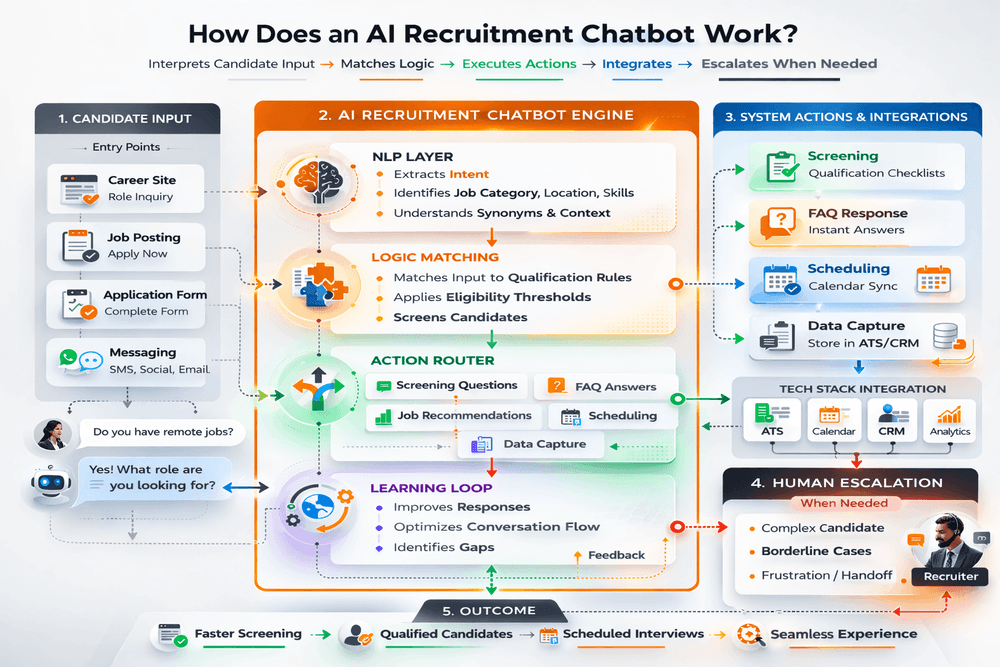
1. Candidate Initiates Conversation
A candidate visits your career site or receives a message link. The chatbot greets them and asks an opening question based on where they entered the conversation.
Common entry points:
- Career site homepage: "What type of role are you looking for?"
- Specific job posting: "Interested in this role? I can help you apply or answer questions."
- Application form: "I can help you complete this application. What questions do you have?"
2. Natural Language Processing (NLP) Analyzes Input
When the candidate types a response, the NLP engine breaks down their message to understand intent and extract key information.
For example:
- Candidate types: "Do you have remote software engineer jobs in New York?"
- NLP identifies: Job category (software engineer), work mode (remote), location (New York)
- Bot responds with relevant job matches and asks follow-up questions
This differs from keyword matching. The chatbot understands variations like "work from home engineer positions" or "NYC-based dev roles that are remote" as the same intent.
3. Chatbot Executes Programmed Actions
Based on the candidate's input and your predefined rules, the chatbot takes action:
Screening actions:
- Asks qualification questions (years of experience, required skills, work authorization)
- Evaluates responses against minimum requirements
- Progresses eligible candidates through the workflow or delivers structured disqualification messaging.
Information actions:
- Answers FAQs about benefits, culture, or the application process
- Provides job descriptions or salary ranges
- Explains next steps in the hiring process
Scheduling actions:
- Synchronizes with the calendars of respective interviewers to coordinate availability in real time.
- Offers time slots to candidates
- Confirms appointments and sends reminders
Data collection actions:
- Captures contact information
- Records qualification responses
- Tags candidates for recruiter follow-up
4. Integration With Your Existing ATS
The AI Recruitment chatbot then connects to your existing ATS tools to execute actions and pass data:
ATS integration: Candidate information flows automatically into profiles. Qualification responses populate screening fields. Application status updates trigger chatbot messages.
Calendar integration: The chatbot reads the interviewer's availability and books slots without manual coordination.
CRM integration: Candidate conversations sync to your talent database for nurturing campaigns.
5. Machine Learning Improves Over Time
AI-powered chatbots learn from interactions. When candidates rephrase questions, abandon conversations, or provide feedback, the system identifies patterns.
What improves:
- Response accuracy for ambiguous questions
- Conversation flow optimization
- Identification of missing FAQ content
What does not improve automatically:
- Your qualification criteria (you control this)
- Which questions to ask (you define this)
- When to escalate to human recruiters (you configure this)
6. Human Escalation When Needed
The chatbot should recognize when it cannot help and hand off the conversation to a human recruiter.
Common escalation triggers:
- Candidate asks complex questions outside the chatbot's scope
- Candidate requests to speak with a recruiter directly
- Candidate expresses frustration or confusion
- Screening reveals a borderline qualification that needs human intervention for a proper review
AI recruiting software like AiPersy integrates chatbots with parallel screening workflows, so candidate conversations automatically trigger next steps like AI interviews or recruiter review based on qualification criteria you define earlier.
What Tasks Can an AI Recruitment Chatbot Automate in Hiring?
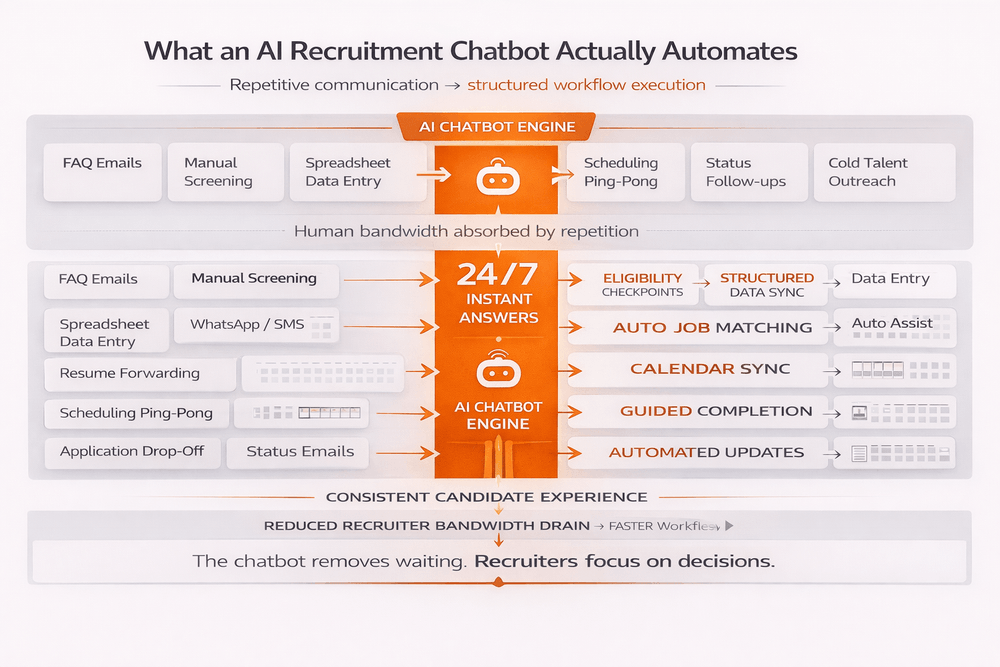
AI recruitment chatbots handle repetitive communication and administrative tasks that do not require human intervention. They work best for structured, high-frequency interactions where consistency matters.
Here are the hiring tasks they actually automate:
1. Answering Candidate Questions
The chatbot resolves high-volume inbound candidate queries without requiring recruiter involvement.
What candidates ask:
- "What benefits do you offer?"
- "Is this role remote or onsite?"
- "What's the salary range?"
- "How long does the hiring process take?"
- "Do you sponsor work visas?"
Why this matters: Candidates get immediate answers 24/7 instead of waiting for email responses or business hours.
2. Basic Qualification Screening
The chatbot applies eligibility checkpoints to determine alignment with predefined role requirements.
Example screening flow:
- "Do you have a bachelor's degree or equivalent experience?" (Yes/No)
- "How many years of experience do you have in sales?" (0-2, 3-5, 6+)
- "Are you authorized to work in the United States?" (Yes/No)
- "What is your expected salary range?" (Open field)
Candidates meeting defined qualification criteria progress through the hiring workflow automatically.
Those who do not receive immediate feedback, rather than waiting weeks for rejection.
3. Collecting Candidate Information
The chatbot captures contact details, work history, and preferences during conversations.
Data collected:
- Name, email, phone number
- Current role and company
- Years of experience
- Preferred job types and locations
- Resume upload
Structured candidate data synchronizes directly into your applicant tracking system, eliminating the need for manual entry.
4. Job Recommendations
Based on candidate responses, the chatbot suggests relevant open positions.
Example:
- Candidate: "I'm looking for remote engineering roles"
- Bot: "We have 3 remote engineering positions: Senior Backend Engineer, Frontend Developer, DevOps Engineer. Which interests you most?"
- Candidate: "Backend Engineer"
- Bot: "Great. Here's the job description. Ready to apply?"
5. Interview Scheduling
The chatbot reads interviewer availability from connected calendars and books time slots automatically.
How it works:
- Candidate passes screening
- Bot: "You're a strong fit. Let's schedule your first interview."
- Bot displays available time slots
- Candidate selects preferred time
- Interview confirmed, calendar invites sent
This eliminates the 5-10 email exchanges that typically happen during manual scheduling.
6. Application Guidance
The chatbot walks candidates through multi-step applications, explaining what information is needed and why.
What it helps with:
- Uploading required documents
- Completing assessment tests
- Answering application questions
- Confirming submission
Application abandonment decreases when expectations and next steps are clearly structured.
7. Status Updates
The chatbot provides application status updates without recruiter prompts.
Automated messages:
- "We received your application and will review it within 3 business days"
- "You've advanced to the interview stage. Expect a scheduling link within 24 hours"
- "Thank you for interviewing. We'll share a decision by [date]"
Candidates stay informed. Recruiters do not field "what's my status?" emails.
8. Re-engagement of Past Applicants
The chatbot reaches out to previous candidates when new relevant roles open.
Example:
- "Hi Sarah, you applied for a Marketing Manager role 6 months ago. We now have a Senior Marketing Manager position open. Interested in learning more?"
This reactivates abandoned internal talent pipelines without incremental recruiter outreach.
9. Event Registration and Coordination
For recruiting events, job fairs, or webinars, the chatbot handles registrations and sends reminders.
What it manages:
- Event signups
- Calendar holds
- Reminder messages
- Post-event follow-ups
10. Feedback Collection
After interviews or rejections, the chatbot requests candidate experience feedback.
Questions asked:
- "How would you rate your interview experience?" (1-5 stars)
- "What could we improve?"
- "Would you apply to other roles with us?"
This data helps you identify friction points in your candidate experience.
What Are the Different Types of AI Recruitment Chatbots?
AI recruitment chatbots vary by communication method, deployment location, and level of intelligence. The type you need depends on your hiring volume, candidate preferences, and where bottlenecks appear in your process.
Here are the main types:
1. Text-Based Chatbots
These handle conversations through typed messages on career sites, ATS platforms, or messaging apps like WhatsApp, SMS, or Slack.
What they do:
- Answer FAQs about roles, benefits, and the application process
- Screen candidates with qualification questions
- Guide applicants through multi-step forms
- Send status updates and reminders
Best for: High-volume hiring where speed matters more than conversational depth. Works well for entry-level to mid-level roles.
Limitation: May lack the relational nuance required for executive or highly specialized hiring.
Examples: Most career site chatbots, ATS-integrated bots
2. Voice-Enabled Chatbots
These use speech recognition and natural language processing to conduct spoken conversations over the phone or with voice assistants like Alexa or Google Assistant.
What they do:
- Conduct automated phone screenings
- Help candidates apply verbally without typing
- Schedule interviews through voice commands
- Provide hands-free application assistance
Best for: Candidates who prefer verbal communication, on-the-go interactions, or roles where phone presence matters (sales, customer service).
Limitation: Speech recognition accuracy varies with accents, background noise, and speech patterns. Complex or nuanced conversations can confuse the system.
Examples: Phone screening bots, IVR-integrated systems
3. Hybrid Chatbots (Text + Voice)
These combine text and voice channels, starting with text for basic tasks and switching to voice when complexity increases or candidate preference shifts.
How they work:
- Candidate begins a conversation via text on the career site
- The bot offers a voice option for detailed questions or screening
- System switches seamlessly between channels based on context
Best for: Organizations wanting flexibility to accommodate different candidate preferences without maintaining separate systems.
Limitation: Requires strong integration between text and voice systems. Transitions between modes must be smooth, or candidates experience friction.
Examples: Advanced platforms offering multi-channel engagement
4. Rule-Based Chatbots
These follow fixed decision trees and keyword matching. They do not learn or adapt over time.
How they work:
- Candidate input matches predefined keywords
- The bot follows scripted response paths
- No understanding of context or intent beyond exact keyword matches
Best for: Very simple, repetitive tasks with limited variation (collecting contact info, answering basic FAQs).
Limitation: Lacks contextual language interpretation capabilities. If candidates ask questions outside the script, the bot fails or provides generic responses. Requires manual updates to improve.
Status in 2026: Most organizations have moved beyond purely rule-based bots to AI-powered alternatives.
5. AI-Powered Chatbots (NLP-Based)
These use natural language processing and machine learning to understand context, intent, and varied phrasing.
How they differ:
- Understand multiple ways of asking the same question
- Ask relevant follow-up questions based on previous answers
- Learn from interactions to improve accuracy
- Handle ambiguous or complex queries better than rule-based bots
Best for: Most modern recruitment scenarios where candidate questions vary and conversation quality matters.
Limitation: Still requires deliberate configuration of eligibility criteria and governance rules. AI understands language better, but does not automatically know your hiring requirements.
Examples: Most chatbots marketed in 2026, including those from AiPersy, Paradox, and HireVue
6. Chatbots by Deployment Location
Beyond communication method, chatbots differ by where they operate:
Career site chatbots: Embedded on your jobs page, help visitors find roles and start applications.
ATS-integrated chatbots: Operate within your applicant tracking system, guide candidates through the application workflow.
Messaging app chatbots: Deployed on WhatsApp, SMS, Facebook Messenger, or Slack for mobile-first candidate engagement.
Standalone chatbots: Operate independently with their own interface, typically for specific campaigns or events.
7. Chatbots by Intelligence Level
Basic screening chatbots: Ask simple yes/no qualification questions, collect information, and provide FAQs.
Conversational chatbots: Engage in back-and-forth dialogue, ask follow-up questions, and adapt responses based on candidate input.
Agentic chatbots: Take autonomous actions based on conversations, such as schedule interviews, trigger assessments, update candidate status, without requiring human approval for each step.
How Is an AI Recruitment Chatbot Different From Traditional Recruitment Chatbots?
The key difference is how they process language and handle unexpected inputs. Traditional chatbots follow fixed scripts. AI chatbots understand intent and adapt to varied phrasing.
Here's the practical comparison:
| Factor | Traditional Chatbot | AI Recruitment Chatbot |
| Language processing | Keyword matching only | Natural language understanding (NLP) |
| Handling variations | Requires exact phrasing | Interprets varied linguistic patterns that signal the same candidate intent. |
| Learning capability | Static, requires manual updates | Learns from interactions over time |
| Conversation flow | Fixed decision tree | Dynamic, adapts based on the context of the conversation |
| Setup complexity | Must script every possible path | Configure intent and let AI handle variations |
| Response quality | Generic when outside the script | Contextual, relevant to the candidate's input |
| Maintenance | Frequent manual script updates | Continuously optimizes response handling based on interaction data |
Companies using AI chatbots instead of traditional rule-based bots typically see:
- 30-50% faster screening cycles
- 60-70% reduction in candidate drop-off during conversations
- 80% less time spent updating chatbot scripts
- Higher candidate satisfaction scores due to natural conversation flow
AI recruiting tools like AiPersy use AI-powered chatbots that integrate with parallel screening workflows, so conversations automatically trigger interviews or recruiter review based on qualification thresholds rather than requiring manual handoffs.
How Is an AI Recruitment Chatbot Different From Conversational AI?
An AI recruitment chatbot is a specific application of conversational AI built for hiring tasks. Conversational AI is the underlying technology. AI recruitment chatbots use that technology to handle candidate interactions, screening, and scheduling.
Think of it in this manner: Conversational AI is the engine, and AI recruitment chatbots are vehicles built for recruiting using that engine.
| Aspect | General Conversational AI | AI Recruitment Chatbot |
| Purpose | General-purpose conversation | Specific recruiting tasks |
| Knowledge | Broad but generic | Your roles, requirements, and hiring process |
| Actions | Provides information only | Screens, schedules, updates ATS |
| Integration | Standalone | Connected to ATS, calendar, CRM |
| Training | Pre-trained on general data | Configured with your hiring criteria |
| Scope | Unlimited topics | Focused on recruitment workflow |
The Technical Difference:
Conversational AI (the technology):
- Natural language processing (NLP) that understands intent
- Machine learning that improves from interactions
- Context awareness across multi-turn conversations
- Ability to handle varied phrasing and follow-up questions
AI recruitment chatbot (the application):
- Conversational AI configured specifically for hiring workflows
- Pre-built conversation flows for screening, scheduling, FAQs
- Integration with ATS, calendars, and recruiting tools
- Domain knowledge about recruitment processes and terminology
Practical Example:
General conversational AI (like ChatGPT): You could ask ChatGPT: "I'm looking for a job in marketing. What should I do?"
ChatGPT might give general career advice, resume tips, or job search strategies. But it cannot:
- Show you actual open positions at your company
- Screen you for specific roles
- Schedule interviews with your team
- Update your candidate status in your ATS
AI recruitment chatbot: Uses the same underlying AI technology but connects to your hiring systems and follows your recruitment logic:
- Candidate: "I'm looking for a job in marketing."
- Bot: "We have 3 marketing roles open: Content Manager, Social Media Lead, Marketing Analyst. Which interests you most?"
- Candidate: "Content Manager"
- Bot: "Great. This role requires 3+ years of content experience. Do you meet that requirement?"
- Candidate: "Yes, I have 4 years."
- Bot: "Perfect. Let me ask a few qualification questions, then we can schedule your interview."
The chatbot uses conversational AI but operates within your hiring workflow with your specific roles, requirements, and processes.
How Is an AI Recruitment Chatbot Different From an ATS?
An AI recruitment chatbot handles candidate conversations. An ATS (Applicant Tracking System) manages candidate data and hiring workflows. They serve different purposes and often work together.
Here's the clear distinction:
What Each System Actually Does
AI Recruitment Chatbot:
- Primary function: Real-time candidate interaction
- Answers questions instantly
- Applies structured qualification criteria through conversational workflows
- Schedules interviews automatically
- Guides candidates through applications
- Engages passive candidates proactively
ATS (Applicant Tracking System):
- Primary function: Candidate data management and workflow tracking
- Stores candidate profiles and application history
- Tracks candidates through hiring stages
- Manages job postings and requisitions
- Provides reporting and analytics
- Handles offer letters and onboarding documents
| Function | AI Recruitment Chatbot | ATS |
| Candidate interaction | Real-time conversations, 24/7 | Email notifications, status updates |
| Data entry | Captures information through chat | Requires manual input or form submissions |
| Screening | Asks questions conversationally | Parses resumes, filters by keywords |
| Interview scheduling | Books slots through conversation | Requires manual coordination or a separate scheduling tool |
| Candidate experience | Dynamic and engagement-driven | Passive, form-based |
| Workflow automation | Conversation triggers actions | Stage transitions trigger notifications |
| Data storage | Sends data to ATS | Stores all candidate data |
| Reporting | Conversation metrics | Full hiring pipeline analytics |
| Primary user | Candidates | Recruiters and hiring managers |
The purpose-built tools like AiPersy typically integrate with existing ATS systems rather than replacing them, so candidate conversations automatically create and update ATS profiles without manual data transfer.
How Is an AI Recruitment Chatbot Different From an AI Interviewer?
An AI recruitment chatbot handles candidate conversations throughout the hiring process. An AI interviewer conducts structured interviews and evaluates responses. They work at different stages and serve different purposes.
Here's the clear distinction:
What Each Tool Actually Does
AI Recruitment Chatbot:
- Primary stage: Sourcing and pre-screening
- Answers candidate questions in real-time
- Applies front-end eligibility criteria through conversational gating
- Schedules interviews automatically
- Engages passive candidates via messaging
- Guides candidates through the application process
AI Interviewer:
- Primary stage: Interview and assessment
- Conducts structured interviews with predefined questions
- Evaluates candidate responses against role criteria
- Scores skills and competencies
- Provides transcripts and detailed feedback reports
- Ranks candidates based on interview performance
Have a look at this side-by-side comparison
| Aspect | AI Recruitment Chatbot | AI Interviewer |
| Hiring stage | Sourcing and pre-selection | Interview and assessment |
| Primary function | Candidate engagement and qualification | In-depth skill evaluation |
| Interaction style | Back-and-forth conversation, candidate-initiated questions | Structured question-and-answer format |
| Communication channels | Text (career site, SMS, WhatsApp, email) | Video, audio, or text responses to preset questions |
| Evaluation depth | Basic qualification screening (yes/no, multiple choice) | Skill-based scoring with evidence and feedback |
| Time commitment | 2-5 minutes per candidate | 15-30 minutes per candidate |
| Scalability | Handles thousands of simultaneous conversations | Handles hundreds of simultaneous interviews |
| Output | Qualified vs. disqualified candidates, job fit scores | Detailed transcripts, skill ratings, and rankings |
| When it runs | Throughout the hiring process, 24/7 | After initial screening, before human interviews |
Most hiring teams need both. Chatbots at the top of the funnel for volume. AI interviewers in the middle for structured assessment. Humans at the end for final hiring decisions.
Therefore, always make a choice based on where your current bottleneck exists: candidate engagement or interview capacity.
What Are the Benefits of Using an AI Recruitment Chatbot?
AI recruitment chatbots reduce administrative recruiting load, standardize early-stage qualification, and eliminate response-time bottlenecks that contribute to application abandonment.
They work best when handling high-frequency, repetitive interactions that do not require human judgment.
Here are their benefits:
1. Instant Candidate Responses (24/7)
Candidates get answers immediately instead of waiting hours or days for email responses.
What this prevents:
- Candidates accepting other offers while waiting for your response
- Application abandonment due to unanswered questions
- Negative employer brand perception from slow communication
Impact: Organizations using chatbots see a 30-40% increase in completed applications due to immediate engagement.
2. Reduced Recruiter Time on Repetitive Questions
Chatbots handle the same 20-30 questions that consume 40-60% of recruiter communication time.
Common questions automated:
- "What benefits do you offer?"
- "Is this role remote?"
- "What's the salary range?"
- "How long does hiring take?"
- "What's my application status?"
Time saved: Companies like L'Oréal save approximately 40 minutes per applicant by automating FAQ responses and basic screening.
3. Accelerated Front-End Qualification
Chatbots ask knockout questions immediately instead of waiting for recruiters to manually review applications.
What happens:
- Candidates disqualified early exit gracefully
- Qualified candidates move to the next stage immediately
- No 3-7 day delay between application and initial response
Result: Qualified candidates experience momentum. Unqualified candidates receive closure. Recruiters focus only on viable prospects.
4. Compressed Interview Coordination Cycles
Chatbots read calendar availability and book interviews automatically through conversation.
Traditional scheduling:
- 5-10 email exchanges
- 3-7 days to find mutual availability
- Coordination across time zones
Chatbot scheduling:
- Single conversation
- Immediate booking
- 85% reduction in scheduling time
Impact: Faster time-to-interview means fewer candidates lost to competing offers during coordination delays.
5. Consistent Candidate Experience at Scale
Every candidate receives the same information, asked the same screening questions, and evaluated against the same criteria.
What this eliminates:
- Different recruiters providing conflicting information
- Variation in screening rigor across hiring managers
- Inconsistent communication quality based on recruiter workload
Result: Fair evaluation and uniform employer brand experience regardless of when candidates apply or which recruiter handles their profile.
6. Reduced Cost Per Candidate Touchpoint
Chatbot interactions cost significantly less than human-handled communications.
Cost comparison:
- Manual FAQ response: $5-$15 in recruiter time
- Chatbot FAQ response: $0.10-$0.50 per interaction
- Manual screening call: $50-$100
- Chatbot screening: $1-$5
At scale: For companies screening 1,000+ candidates annually, this translates to $20,000-$50,000 in saved recruiter time.
7. Scalability Without Adding Headcount
One chatbot handles thousands of simultaneous conversations. Scaling human teams requires proportional hiring.
Scenario:
- Hiring volume increases from 50 to 200 candidates per quarter
- Without chatbot: Requires 2-3 additional recruiters
- With chatbot: Same team handles increased volume
Why this matters: Seasonal hiring spikes, rapid growth, or market expansions do not force emergency recruiter hiring.
8. Lower Application Abandonment Rates
Candidates abandon applications when they encounter friction or delays. Chatbots remove both.
Common drop-off points:
- Unclear application requirements
- Unanswered questions about role or company
- Waiting for scheduling confirmation
- Lengthy forms without guidance
Chatbot intervention:
- Explains requirements in real-time
- Answers questions immediately
- Confirms next steps instantly
- Guides through complex forms
Result: Higher application completion rates and larger qualified candidate pools.
9. Proactive Candidate Re-engagement
Chatbots reach out to past applicants when new relevant roles open, reactivating your talent database.
Example: "Hi John, you applied for a Marketing Manager role 4 months ago. We now have a Senior Marketing Manager position open that matches your background. Interested?"
Impact: Lower cost-per-hire by engaging the existing talent pool before external sourcing.
10. Data Collection Without Forms
Instead of asking candidates to fill out lengthy forms, chatbots collect information conversationally.
Traditional approach: "Please complete this 15-field application form"
Chatbot approach: "What type of role are you looking for?" → "How many years of experience do you have?" → "What's your preferred work location?"
Result: Improved completion rates and higher-fidelity candidate data because candidates engage naturally rather than filling forms mechanically.
AI interviewer tools like AiPersy integrate chatbots with screening and interview workflows, so candidate conversations automatically trigger next steps based on qualification thresholds rather than requiring manual recruiter handoffs.
Are AI Recruitment Chatbots Biased or Legally Risky?
Yes. AI recruitment chatbots can introduce bias and create legal risk when configured poorly or used without proper oversight. However, the risk comes from how you implement them, not from the technology itself.
Where Bias Can Appear
Training data reflects past discrimination. When you train chatbots on historical hiring data that favored certain groups over others, the AI learns and repeats those patterns. For example, if your company historically hired fewer women for technical roles, the chatbot may learn to screen out female candidates even when they are qualified.
Poorly designed screening questions introduce bias. Vague questions like "Are you a culture fit?" are subjective and legally risky. Questions about employment gaps without context can discriminate against caregivers or veterans. Requiring college degrees may exclude qualified candidates from underrepresented backgrounds.
Language processing creates disparities. Natural language systems can misinterpret responses from non-native English speakers, people with accents, or candidates using different dialects. This results in qualified candidates receiving lower scores unfairly.
Neutral criteria can mask discrimination. Requirements that seem neutral may correlate with protected characteristics. Zip code filters correlate with race and income. University name filters correlate with wealth. Years of experience thresholds can serve as age discrimination proxies.
Legal Risks You Face
Organizations remain legally accountable for discriminatory outcomes, even if a vendor built the software. Employers remain legally responsible for bias in their hiring process regardless of who created the chatbot.
If your software disproportionately screens out protected groups, you face legal action even without discriminatory intent.
The "black box" problem creates legal exposure. When you cannot explain why your chatbot rejected a candidate, you cannot defend that decision in court or to regulators. Saying "the AI scored them low" is not a legally defensible explanation.
Regulations are increasing across jurisdictions.
- NYC Local Law 144: Requires annual independent bias audits and candidate notification when AI is used
- EU AI Act: Classifies recruitment AI as "high-risk" and requires transparency, regular testing, and documentation
- Illinois AI Video Interview Act: Requires obtaining candidate consent and explaining how the AI evaluates them
- GDPR (EU/EEA): Imposes strict requirements for processing personal data and gives candidates the right to explanation
How to Reduce Risk
1. Maintain human oversight at all stages
AI chatbots should inform human decisions, not make them independently. Configure chatbots to screen and rank candidates, but always have a recruiter review results before rejecting anyone.
Document your human review process and train reviewers on what to look for.
2. Conduct regular bias audits
Test whether your chatbot disproportionately screens out protected groups. Track screening outcomes by demographic factors where legally permitted. Compare pass rates across groups. If disparities exceed the 4/5ths rule (80% threshold), investigate the cause and document your corrective actions. Audit at least annually, quarterly for high-volume hiring.
3. Use only job-related screening criteria
Every screening question must be necessary for performing the job successfully. Ask yourself: Can I prove this criterion predicts job success?
Does this question screen for actual skills or for characteristics that correlate with protected groups?
Avoid subjective questions like "culture fit" or requirements like specific universities that serve as proxies for protected characteristics.
4. Notify candidates clearly
Tell candidates when AI is being used in their screening process. Explain what the chatbot evaluates and how decisions are made.
Provide a way for candidates to request human review if they believe the screening was incorrect.
This transparency reduces legal risk and improves candidate experience.
5. Document your compliance efforts
Keep records of why you chose each screening question, how you validated they are job-related, your bias audit results and corrective actions, your human review process and training materials, and your candidate notification procedures.
This documentation demonstrates that you took reasonable steps to prevent discrimination, should you face legal scrutiny.
6. Choose vendors with transparency and accountability
Ask potential vendors: How does your system prevent bias? Can we audit individual screening decisions? Do you provide regular bias audit reports? What compliance certifications do you hold? Who bears legal liability if the system creates discriminatory outcomes? Avoid vendors who claim their AI is completely unbiased or who cannot explain how their system makes decisions.
How Much Does an AI Recruitment Chatbot Cost in 2026?
AI recruitment chatbot costs range from $200 per month for basic platforms to $150,000+ for fully custom enterprise solutions.
Most organizations allocate between $5,000 and $30,000 annually, depending on hiring volume and workflow complexity.
Here's the realistic breakdown:
Pricing Models
1. Subscription-Based Platforms (Most Common)
Pre-built chatbot platforms charge monthly or annual fees based on usage.
Pricing tiers:
- Basic: $200-$500/month ($2,400-$6,000/year)
- Text-based FAQ chatbot
- Basic screening questions
- Up to 500 candidate interactions/month
- Limited integrations
- Professional: $500-$2,000/month ($6,000-$24,000/year)
- Natural language processing
- ATS integration
- Up to 2,000 interactions/month
- Advanced screening logic
- Multi-channel support (web, SMS, WhatsApp)
- Enterprise: $2,000-$10,000+/month ($24,000-$120,000+/year)
- Custom conversation flows
- Unlimited interactions
- Deep integrations (ATS, CRM, calendar, HRIS)
- Dedicated support
- Compliance features and audit trails
Best for: Companies hiring 50-500 people per year who want proven solutions without custom development.
2. Custom Development
Building a chatbot from scratch for specific requirements.
Cost range: $50,000-$250,000+ upfront plus ongoing maintenance
What drives cost:
- Basic custom chatbot: $50,000-$100,000
- Rule-based logic
- Simple screening flows
- Basic ATS integration
- 3-5 month development timeline
- Advanced AI chatbot: $100,000-$250,000+
- Large language model integration (GPT, Claude, custom LLM)
- Natural language understanding
- Multi-language support
- Complex integrations with multiple systems
- Voice capabilities
- 6-12 month development timeline
Ongoing costs: 20-30% of initial development cost annually for maintenance, hosting, model updates
Best for: Large enterprises with unique workflows or strict compliance requirements that off-the-shelf platforms cannot meet.
3. Where to Start
If you hire fewer than 50 people per year: Start with a basic $200-$500/month plan. Test for 3 months. Upgrade if it works.
If you hire 50-200 people per year: Go straight to the professional tier ($1,000-$2,000/month). The features matter at this volume.
If you hire more than 200 people per year: Get quotes from 3 vendors. Negotiate based on volume. Consider custom if needs are very specific.
Everyone: Start with a subscription. Don't build custom unless subscription platforms truly can't do what you need.
Most companies spend $1,000-$3,000 per month on AI recruitment chatbots. That breaks down to about $50-$150 per hire when you factor in setup costs.
If the software saves recruiters 5–10 hours per week, it typically justifies investment within a single hiring cycle.
How Do You Implement an AI Recruitment Chatbot?
Implementing an AI Recruitment Chatbot typically takes 3-6 weeks if you follow a clear process. Most companies go live within a month by starting small, testing thoroughly, and expanding gradually.
Step 1: Choose Your Platform (Week 1)
What to look for:
Does it integrate with your ATS? If the chatbot cannot send candidate data to your ATS automatically, you will waste time on manual data entry.
Can you test it before buying? Most vendors offer 14-30 day trials. Test with real candidates, not just internal demos.
Is the pricing clear? Avoid vendors who will not share pricing upfront. You should know what you will pay before signing anything.
Do other companies in your industry use it? Check reviews from companies similar to yours. A tool that works for tech startups may not work for healthcare hiring.
Red flags:
- No trial or demo available
- Cannot explain how it prevents bias
- Requires 3+ year contract upfront
- Pricing only available "after consultation"
Step 2: Define What It Should Do (Week 1-2)
Start with the simplest version that solves your main problem.
If your problem is: Candidates ask the same questions
What the chatbot should do:
- Answer 10-15 most common questions
- Direct candidates to apply if interested
- Capture email for follow-up if they are not ready
If your problem is: Screening takes too much recruiter time
What the chatbot should do:
- Ask 3-5 knockout questions
- Route qualified candidates to application
- Thank unqualified candidates and suggest job alerts
If your problem is: Interview scheduling takes forever
What the chatbot should do:
- Confirm candidate passed screening
- Show available interview times
- Book slot and send calendar invite
Write down exactly what success looks like:
- "Chatbot handles 70% of candidate questions without recruiter help"
- "Qualified candidates get interview slots within 24 hours"
- "Application completion rate increases from 40% to 55%"
Step 3: Connect to Your Existing Tools (Week 2-3)
ATS integration (most important):
The vendor should handle most of this. You will need to provide:
- ATS login credentials or API access
- Which fields to sync (name, email, phone, resume, screening responses)
- When to create candidate profiles (immediately, after screening, after application)
Test this thoroughly. Send 5 test candidates through. Verify they appear correctly in your ATS.
Calendar integration (if scheduling interviews): Connect the recruiter and hiring manager calendars.
Set:
- Available time slots for interviews
- Buffer time between interviews
- Maximum interviews per day
- Time zones
Other integrations:
Only connect what you will actually use. Do not integrate for the sake of integrating.
Step 4: Write Your Conversation (Week 2-3)
Start with a greeting:
Bad: "Hello. I am a bot. How can I help?"
Better: "Hi! I am here to help you learn about our open roles and apply. What type of position are you looking for?"
Keep questions simple:
Bad: "Could you please provide information about your professional background and experience relevant to the position you are interested in?"
Better: "How many years of experience do you have in sales?"
Give clear next steps:
Bad: "Thank you for your interest."
Better: "You meet the basic requirements! I will send you an application link. Most people complete it in 10 minutes. Ready to apply?"
Write for your specific candidates:
Entry-level roles: Casual, encouraging tone
Senior roles: Professional, efficient tone
Technical roles: Direct, skip unwanted information
Step 5: Test With Real People (Week 3-4)
Internal testing first: Have 5-10 team members go through the chatbot:
- Do they understand the questions?
- Does the flow feel natural?
- Does data appear correctly in your ATS?
- Can they actually book interview times?
Fix obvious issues before showing candidates.
Beta test with candidates: Pick one role. Run 20-30 candidates through the chatbot. Watch what happens:
- Where do they drop off?
- What questions confuse them?
- What do they ask that the chatbot cannot answer?
Adjust based on what you learn.
Step 6: Train Your Team (Week 4)
Recruiters need to know: How to review chatbot conversations. Where completed screening responses appear. When to intervene if a candidate gets stuck. How to adjust questions if they are not working.
Hiring managers need to know: What screening questions candidates answered. How the chatbot ranked candidates. That humans still make final hiring decisions.
30-minute training session is usually enough. Record it so new team members can watch later.
Step 7: Launch and Monitor (Week 4-6)
Start small: Launch on one job posting first. Do not roll out company-wide immediately.
Run for 2 weeks. Check:
- How many candidates used it?
- How many completed the flow?
- Where did people drop off?
- What questions came up repeatedly?
Expand gradually: If the pilot works, add 2-3 more roles. Keep monitoring. Adjust questions based on what you see.
After a month, if results are good, roll out to all roles.
FYI: AI recruiter tools like AiPersy typically provide implementation support to help you through these steps, but you still need internal ownership for success.
Which Companies Should Use an AI Recruitment Chatbot?
AI recruitment chatbots work best for companies with high-volume hiring, limited recruiter capacity, or significant scheduling delays. They work poorly for low-volume hiring focused on senior leadership or highly specialized positions.
You Should Use a Chatbot If...
You hire more than 50 people per year
When hiring volume is high, recruiters spend 40-60% of their time answering the same questions, screening basic qualifications, and coordinating schedules. A chatbot handles these tasks automatically.
Example: Bon Secours Mercy Health processes 20,000 hires annually. Their chatbot handles initial screening and scheduling, allowing recruiters to focus on qualified candidates.
ROI appears within: 6-12 months
Candidates apply outside business hours
If most applications come in evenings or weekends, candidates wait 12-24 hours for responses. High-quality candidates accept other offers during this waiting period.
A chatbot engages them immediately, answers questions, and moves them forward 24/7.
Example: Brother International Corporation saw 140% increase in completed applications after adding a chatbot that engaged candidates anytime.
ROI appears within: 3-6 months
Interview scheduling creates significant delays
When coordinating interviews takes 5-10 email exchanges and 3-7 days to find mutual availability, you lose candidates to faster-moving competitors.
Example: Mastercard reduced scheduling time by 85% and scheduled 88% of interviews within 24 hours using automated scheduling.
ROI appears within: 3-6 months
Application drop-off rates are high
If 50-70% of candidates start applications but do not finish, they likely have unanswered questions or encounter friction during the process.
Chatbots guide candidates through applications, answer questions immediately, and reduce drop-off.
Example: Electrolux saw 51% decrease in incomplete applications and 84% increase in application conversion after implementing chatbot guidance.
ROI appears within: 6-9 months
You operate in high-turnover industries
Retail, hospitality, healthcare, and contact centers hire continuously. Recruiters cannot manually handle a constant application flow.
Industries where chatbots work well:
- Retail and hospitality (seasonal hiring spikes)
- Healthcare (nursing, clinical staff shortages)
- Customer service and call centers
- Warehousing and logistics
- Food service
Example: Companies like Hilton, Chipotle, and Stanford Health Care use chatbots to manage continuous high-volume hiring.
Your team is distributed across time zones
When recruiters and candidates operate in different time zones, scheduling becomes nearly impossible without automation.
Chatbots work across all time zones, allowing candidates to interact and schedule immediately, regardless of location.
Best for: Global companies, remote-first organizations, international hiring
You want to improve candidate experience
Candidates expect immediate responses. Waiting days for answers creates negative impressions, even if they eventually get hired.
Chatbots provide instant engagement, status updates, and clear next steps throughout the process.
Result: Better employer brand, higher acceptance rates, more referrals
Final Words
AI recruitment chatbots standardize early-stage candidate engagement, enforce structured qualification logic, and streamline interview coordination.
They work best when they remove scheduling delays and answer repetitive questions without replacing human judgment.
Most companies see ROI within 6-12 months if they hire more than 50 people annually, and candidates frequently ask the same questions, or scheduling creates bottlenecks.
The key is starting with smaller baby steps. Select one high-volume hiring workflow and conduct a 30–60 day controlled pilot to measure impact on time-to-interview, abandonment rate, and recruiter workload.
Adjust your questions based on where confusion appears. Then expand to more roles.
Related reading:
Ready to see how AI chatbots work with parallel screening? AiPersy combines chatbot engagement with automated interview triggers, so candidates move from qualification to evaluation immediately instead of waiting for manual coordination. See how it works →